Login with [anything]: native OIDC login comes to Symfony 8.2

Symfony 8.2, the upcoming version of Symfony, ships a first-class OIDC (OpenID Connect) Authorization Code Flow authenticator. Here is what it does, why it is secure by default, and what I learned building it.
Before diving into this new feature, a few words about OIDC itself. OpenID Connect is an identity layer on top of OAuth 2.0: where OAuth 2.0 grants access to a resource via an access token, OIDC tells you who the user is.
"Log in with Google", "Log in with your company account", "Log in with Keycloak". Every web application ends up needing one of these buttons, and the Symfony community has been answering that need for well over a decade. HWIOAuthBundle has powered social and enterprise logins since the Symfony 2 days. KnpUOAuth2ClientBundle brought the whole league/oauth2-client provider ecosystem into the security system. And drenso/symfony-oidc is the one dedicated to OIDC. Thousands of applications log their users in through these bundles today, and I want to thank their authors before going any further: they paved the way.
As of Symfony 8.2, the OIDC part of that story also lives in the framework itself: an authenticator you configure like any other, with security defaults taken straight from the specification and maintained alongside the Security component. I wrote it, a lot of people reviewed it, and this article is the story of what landed.
Genesis
Symfony has supported OIDC since 6.3, but in one context only: when the Symfony application is an API. In that setup the application is a resource server. It never talks to the identity provider on behalf of a user: a client, a single-page application or a mobile app, obtains a token from the provider on its own and sends it along with every request, as a Bearer header. The access_token authenticator and its OIDC token handlers validate that token, either locally against the provider's keys or by calling its UserInfo endpoint, and map it to a user. Symfony checks a token it did not ask for, and that is all an API needs.
What was missing is the other context, the traditional full-stack web application: server-rendered pages, a session cookie, users who log in with their browser. There, nobody hands the application a token. The feature request has been open on the Symfony tracker [since July 2023](https://github.com/symfony/symfony/issues/50896), and the need is everywhere: a back office behind the company's Keycloak, a SaaS offering its enterprise customers a login through their Microsoft Entra ID tenant, an internal tool behind Authentik. Same flow every time, same checks every time.
So I sat down and wrote it, with one goal in mind: the flow you get by adding a few lines to security.yaml should be the flow you would get from someone who read the specifications end to end. Let's see what that looks like.
The Authorization Code Flow in sixty seconds
Two parties talk to each other: your Symfony application, acting as the Relying Party, and the identity provider. The flow goes like this:
The user requests a protected page. The application generates a state, a nonce and a PKCE verifier, ties them to the session, and redirects the browser to the provider's authorization endpoint.
The user authenticates at the provider, which redirects the browser back to the application's callback URL with an authorization code.
The application checks the state, then exchanges the code for tokens directly with the provider's token endpoint, over TLS, presenting its client credentials and the PKCE verifier.
The provider answers with an ID token and an access token. The application validates the ID token, signature and claims, fetches the user's claims, loads the user, and opens the session.
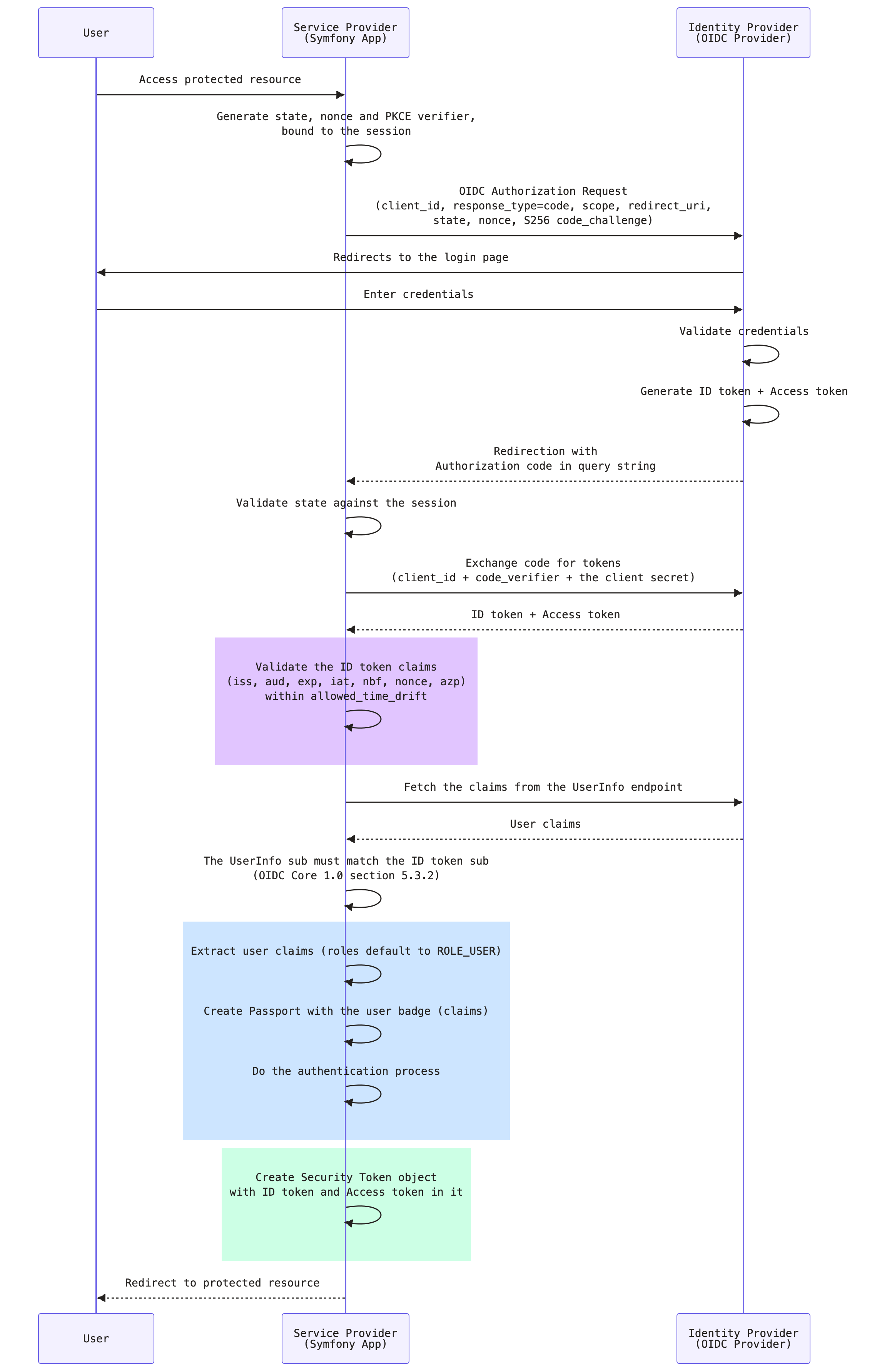 Three redirects and one back-channel call. The difficulty has never been the happy path. It is everything around it: which claims to check, what to do with the nonce, how to make sure the code you receive is the code you asked for, how not to trust a discovery document blindly. That is the part the framework now takes off your hands.
5 minutes to a first login
The authenticator relies on the HttpClient component to talk to the provider, and on web-token/jwt-library to validate the ID token:
composer require symfony/http-client web-token/jwt-library
Then declare the oidc user provider and the oidc_login authenticator on your firewall. A confidential client, which is what a classic server-side application is, needs three values: the issuer URL of your provider, and the client credentials it issued to your application.
# config/packages/security.yaml
security:
    providers:
        oidc_users:
            oidc: ~

    firewalls:
        main:
            provider: oidc_users
            oidc_login:
                provider_uri: '%env(OIDC_PROVIDER_URI)%'
                client_id: '%env(OIDC_CLIENT_ID)%'
                client_authentication:
                    client_secret_basic: '%env(OIDC_CLIENT_SECRET)%'
                scope: ['openid', 'profile', 'email']
Notice what is not there: no authorization endpoint, no token endpoint, no JWKS URL. The authenticator fetches the standard .well-known/openid-configuration endpoint from the issuer, discovers everything it needs, and caches the document for an hour (configurable).
The provider needs a route to redirect to. Symfony declares it for you through a route loader, exactly as it does for the logout routes, and the symfony/security-bundle recipe imports it for you:
# config/routes/security.yaml
_security_oidc_login:
    resource: security.authenticator.oidc_login.route_loader
    type: service
The callback lives at /oidc/callback by default, and the check_path option changes it. Register the full URL at your provider, and you are done: when oidc_login is the only authenticator on the firewall able to start an authentication, it also becomes its entry point, so an anonymous request to a protected page goes straight to the provider.
If your login page offers several ways to log in, the same route loader declares a start route by default, oidclogin_start_<firewall_name> at path /oidc/start, that kicks off the flow on demand:
<a href="{{ path('_oidc_login_start_main') }}">Log in with Keycloak</a>
That is the whole setup. Point OIDC_PROVIDER_URI at a Keycloak realm running in Docker, and you have a working "Log in with" button before your coffee gets cold.
Secure by default, on purpose
This is the section I care about the most, because it is where a home-made implementation and this one part ways. Every check below is on by default. Some can be tuned, none can be turned off by accident.
State and nonce. Both are generated for every attempt, stored in the session, and verified on the way back. The state protects the callback against CSRF, the nonce ties the ID token to the request that asked for it.
PKCE, always. Proof Key for Code Exchange is applied to every authorization request with the S256 method. The authenticator sends a hash of a random verifier, and only reveals the verifier when it exchanges the authorization code, so an intercepted code is useless to anyone else. You can switch to plain for a provider that supports nothing else, and disable it for one that rejects the parameter. A public client cannot disable it at all, since it is the only thing binding the code to the client.
ID token claims. iss (issuer), aud (audience), exp (expire at) and iat (issued at) are mandatory and verified; nbf (not before) and azp (authorized party) are verified when present, and auth_time becomes mandatory and is checked as soon as you set max_age. Clocks drift, so allowed_time_drift gives you a tolerance in seconds, and defaults to 0.
ID token signature. Verified by default against the keys the provider publishes at its jwks_uri. Only RS256 is accepted out of the box, the single algorithm the specification requires providers to support; list the ones your provider announces if it signs with another. No HMAC algorithm is ever accepted, so a public key can never be turned into a shared secret. Keys are cached, and a token signed with an unknown key triggers a refetch, so a key rotation at the provider needs nothing on your side.
HTTPS from discovery down to every endpoint. provider_uri must be an HTTPS URL, with an exception for loopback (localhost, 127.0.0.1, ::1) hosts and reserved test domains (*.localhost) so you can develop locally. The endpoints announced by the discovery document must be HTTPS too, and the issuer it announces must match the one you configured, so a tampered or misconfigured document cannot downgrade the flow. The token endpoint—where your client secret is sent—follows the same rule: HTTPS is required, except for loopback hosts.
No privilege escalation through claims. The built-in oidc user provider never reads roles from the provider: every user gets ROLE_USER, and a roles or user_identifier claim sent by the provider is dropped. Granting roles from a group claim is a decision your application makes, in a user provider you own, and I will show you how below.
None of this is exotic. It is what the OIDC Core specification asks a Relying Party to do. The point is that you no longer have to remember it.
Beyond the happy path
Real deployments are rarely the minimal example, so the authenticator ships with the options you will actually need.
Your own users. The built-in provider is the quickest start, but most applications have a User entity. Any user provider implementing AttributesBasedUserProviderInterface receives the identifier and every claim, and decides what to do with them:
// src/Security/OidcUserProvider.php
public function loadUserByIdentifier(string $identifier, array $attributes = []): UserInterface
{
    // $identifier is the "sub" claim, $attributes holds every claim
    $user = $this->users->findOneBy(['oidcSubject' => $identifier]) ?? new User($identifier);

    $user->setEmail($attributes['email'] ?? null);
    $user->setRoles(\in_array('admins', $attributes['groups'] ?? [], true) ? ['ROLE_ADMIN'] : []);

    $this->entityManager->persist($user);
    $this->entityManager->flush();

    return $user;
}
Where the claims come from. Some providers put every requested claim in the ID token, and some expose no UserInfo endpoint at all. user_data_source: id_token reads them from the validated ID token instead.
Which claim identifies the user. sub is the only claim OIDC guarantees stable and unique. When your users are keyed on another one, user_identifier_claim: email does it, with a warning in the documentation you should read before flipping it: whoever controls that claim at the provider owns the matching account in your application.
How the application authenticates at the token endpoint. The client_authentication option accepts client_secret_basic, client_secret_post, client_secret_jwt, private_key_jwt, none, or the identifier of a service that implements ClientAuthenticationInterface. none declares a public client that does not hold any secrets;; PKCE and signature verification then become mandatory, and the container refuses to compile otherwise.
Shaping the authorization request. max_age asks the provider for a recent authentication and verifies the auth_time claim it must then return. authorization_params passes anything else your provider understands, prompt, ui_locales, login_hint, acr_values, while the parameters the flow relies on stay under the authenticator's control.
Logging out at the provider too. enable_end_session: true redirects to the provider's end_session_endpoint on logout, and post_logout_redirect_path says where to land afterwards.
Calling the provider's APIs. The ID token and the access token are kept as attributes of the security token, so getAttribute('oidc_access_token') hands you a bearer token for the provider's own services. To automatically renew it using the refresh token grant, request a refresh token from the provider (usually with the offline_access scope) and enable the refresh_access_token option.
Tested against real providers
Specifications are one thing, real providers are another. Before the pull request was merged, the authenticator was exercised end to end against Keycloak, Authelia, Microsoft Entra ID, Gravitee Access Management, Authentik and Google. It has since successfully passed the OpenID Foundation's compliance suite at the local level for the Relying Party profile's basic certification level (this is not an official certification).
It paid off immediately. Authentik announces its issuer with a trailing slash. The specification wants the issuer you configure and the issuer the discovery document announces to be identical, and the authenticator trims the configured URL to build the discovery URL from it, so no configuration value could ever match. The fix ignores a trailing slash in that one comparison, and only there: the iss claim of every ID token is still checked, character for character, against the issuer the provider announced. A small thing, but the kind you only find by running the code against a real provider.
What the review changed
The reviews shaped the result at least as much as the initial code did. Signature verification was first planned as a follow-up, since the ID token comes straight from the token endpoint over TLS; the review made a strong case for verifying it by default before 8.2 ships, and that is what happens now.
The rule that a provider must never be able to grant roles through a claim came out of a security audit of the branch. The JWKS response is capped in size and fetched over HTTPS only.
Other design calls survived the review unchanged: reusing the existing OidcUser rather than introducing a new user model, and declaring the callback route through a loader instead of asking you to write a controller.
So, a heartfelt thank you to Florent Morselli (Spomky), whose knowledge of the OpenID specifications turned a working implementation into a rigorous one, to Nicolas Grekas, who reviewed and merged every single pull request of the series and hardened the JWKS handling on the way, and to Yonel Ceruto, Robin Chalas, Alexandre Daubois and Steffen Gransow for their reviews and comments.
What comes next
Symfony 8.2 covers the Authorization Code Flow for one provider per firewall, and that is what the vast majority of applications need. The design leaves room for more, and several items are on my list: multiple providers behind the same firewall, hybrid response types, signed request objects, session_state handling for provider-initiated logout, and dynamic client registration. If one of those is blocking you today, the issue tracker is the place to say so.
Going further
The Symfony documentation has a dedicated page, How to Log in Users with OpenID Connect, covering every option mentioned here and a few I skipped. If you want to see the whole flow running against several providers, clone the demo repository and follow the README.